The Import/Export Devices page in the Universal Interface Service (UIS) pane displays current values and statistics applicable to import/export devices. The import/export device values and statistics displayed are for those devices configured in an associated Device Definition Service (DDS).
For information about configuring communication devices, see Import/Export Devices.
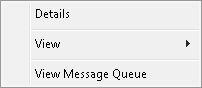
The following table lists and describes Import/Export Devices context menu options.
| Option | Description |
|---|---|
|
Details |
Click to view a detailed report for the selected import/export device. You can also access the import/export device configuration from the resulting dialog box. See Device Details. |
|
View |
Click to display options to view the Remote Devices, Comm Devices, Import/Export Devices, and Current Values pages. |
|
View Message Queue |
Click to display the message queue for a specific import/export device. |
The following table lists and describes Import/Export Devices values and statistics.
| Column | Description |
|---|---|
|
Device ID |
Displays the import/export Device ID as it is configured in the DDS. |
|
Device State |
Indicates the operational state of the device. Values include the following:
|
|
Failed Operations |
|
|
In Progress |
Indicates whether or not an import or export is currently executing. |
|
Status |
Indicates the operational status of the device. Values include the following:
|
|
Succ Operations |
More:

|
|
|


